
TinyPNG
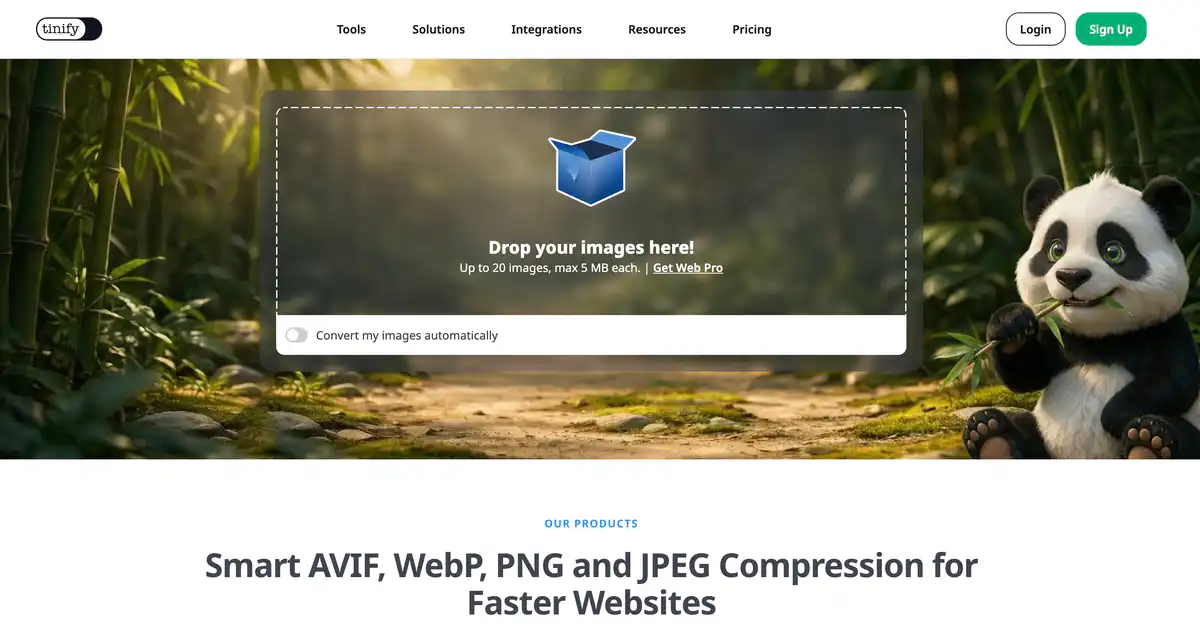
A staple for anyone shipping images on the web—the panda mascot is hard to miss. Drop in PNG, JPEG, WebP, AVIF and more, and it shrinks file sizes with barely visible quality loss, which makes page loads noticeably snappier.
Site Introduction
TinyPNG is an online image compression and format conversion tool that focuses on intelligent slimming of PNG, JPEG, WebP, AVIF, and other formats.
The algorithm analyzes the colors and textures of each image, and can reduce file size by more than 80%, with almost no visible difference to the naked eye. Just drag and drop to use it. People who build websites, do design work, or publish blogs will basically all find it useful.
Core Features
1. Online Image Compression (Web Compressor)
Supports AVIF, WebP, PNG, JPEG, JXL, and APNG. Drag and drop to upload, with processing done directly in the browser. The free version allows up to 20 images per batch, with each image up to 5MB.
2. Image Format Conversion
While compressing, you can also convert to next-generation formats such as WebP and AVIF. Free users can convert up to 3 images per batch. When comparing multiple formats, the one with the smallest file size will be marked with a green checkmark for easy selection.
3. Developer API
Server-side integration allows compression, conversion, cropping, and resizing upon upload. Official clients are available for Ruby, PHP, Node.js, Python, Java, and .NET. More than 6.5 billion images have been processed cumulatively, and it is used by companies such as Airbnb and Microsoft.
4. Supporting Ecosystem
- WordPress Plugin: Automatically compresses JPEG/PNG/WebP images upon upload
- Tinify CDN: Automatic optimization and multi-CDN distribution, including automatic WebP/AVIF conversion
- Website Image Analyzer: Scans any website and estimates how much bandwidth can be saved by optimizing images
Pricing Model
Web Online Compression
| Plan | Price | Main Allowance |
|---|---|---|
| Web Free | $0 | Up to 20 images per batch, 5MB per image; format conversion up to 3 images per batch |
| Web Pro | $39/user/year | Unlimited compression, maximum 75MB per image; conversion still limited to 3 images per batch |
| Web Ultra | $149/user/year | Unlimited compression + unlimited format conversion, maximum 150MB per image; supports folder upload |
Developer API
| Usage | Price |
|---|---|
| First 500 compressions/month | Free |
| 501–10,000 compressions | $0.009/image |
| Beyond 10,000 compressions | $0.002/image |
| Prepaid credit packs | 1000 / 2500 / 5000 compressions, never expire |
Tinify CDN
| Plan | Monthly Fee | Bandwidth |
|---|---|---|
| Basic | $15/month | 10 GB |
| Business | $69/month | 1000 GB |
| Enterprise | $199/month | 3000 GB |
Pricing may change. Please refer to the official pricing pages:
- Web compression: https://tinypng.com/pricing/web
- Developer API: https://tinypng.com/pricing/api
- CDN: https://tinypng.com/pricing/cdn
Comparison with Similar Platforms
Unique Advantages
- Mature compression algorithm with complete preservation of PNG transparency channels; 24-bit PNGs can be compressed to 8-bit indexed color, significantly reducing file size
- Complete product line: free web tool + API + CDN + WordPress plugin, covering everything from individuals to enterprises
- Supports next-generation formats such as AVIF, WebP, and JXL, completing compression and conversion in one step
Practical Highlights
- After multi-format conversion, the smallest file size is automatically marked, so you don't need to compare file sizes yourself
- API offers 500 free compressions per month, which is enough for small projects or blogs for several months
Objective Limitations
- The free web version has per-session limits (20 images per batch, 3 format conversions per batch), so large batches require payment or multiple operations
- Images need to be uploaded to Tinify servers for processing, so privacy-sensitive materials must be evaluated by yourself; officially, files are retained for up to 48 hours before deletion
Comparison with Similar Tools
| Comparison Item | TinyPNG | Squoosh (Google) | ShortPixel |
|---|---|---|---|
| Usage Method | Online + API + CDN | Purely local browser processing | Mainly WordPress plugin + API |
| Free Allowance | 20 images/batch, 5MB/image | Completely free, no limit | 100 images/month (plugin) |
| Format Support | AVIF, WebP, PNG, JPEG, JXL | AVIF, WebP, PNG, JPEG, etc. | JPEG, PNG, GIF, PDF, etc. |
| Batch/API | Yes, 500 free/month | No API | Yes, pay-as-you-go |
| Privacy | Uploaded to cloud, deleted after 48h | Processed locally, not uploaded | Uploaded to cloud for processing |
| Paid Starting Price | Web Pro $39/year | Free | Around $4.99/month |
Frequently Asked Questions
1. Is TinyPNG really free?
Web compression is free, with up to 20 images per batch and 5MB per image. The API includes 500 free compressions per month. If you want unlimited batch processing or larger files, you need to buy Web Pro ($39/year) or Web Ultra ($149/year).
2. Will image quality degrade after compression?
It uses intelligent lossy compression, not traditional "lossless" compression. In typical web scenarios, the difference is hard to notice with the naked eye, but the file size can be much smaller. The official website has before-and-after comparison sliders so you can verify it yourself.
3. Which image formats are supported?
Compression: AVIF, WebP, PNG, JPEG, JXL, APNG. HEIC uploads are automatically converted to JPG. Free users can convert up to 3 formats per batch; Web Ultra has no limit.
4. Is uploading images safe?
Only you can access the images you upload. They are retained for up to 48 hours and then permanently deleted. For confidential or client materials, it is recommended to use the API to build your own workflow, or choose a local tool such as Squoosh.
5. What happens if the API exceeds the 500 free compressions?
It will return Your monthly limit has been exceeded. You can wait for the monthly reset, upgrade to pay-as-you-go pricing (starting at $0.009/image), or buy credit packs (which never expire).
6. How do I use it with a WordPress website?
Install the official plugin "Compress JPEG & PNG images" and register an API Key. Images are automatically compressed upon upload, and billing is the same as the Developer API, with 500 free compressions per month.
7. What is the difference between TinyPNG and local tools like ImageOptim or Caesium?
TinyPNG runs in the cloud, requires no software installation, and also supports API and CDN automation. Local tools keep images on your machine, making them suitable for large batches or scenarios with high privacy requirements. TinyPNG's free version has session limits, while local tools usually do not have this restriction.