
Pixlr
Edit, cut out, and generate with AI in one place—handy if you hate installing software. Browser-based photo editor and AI creative suite for retouching and text-to-image.
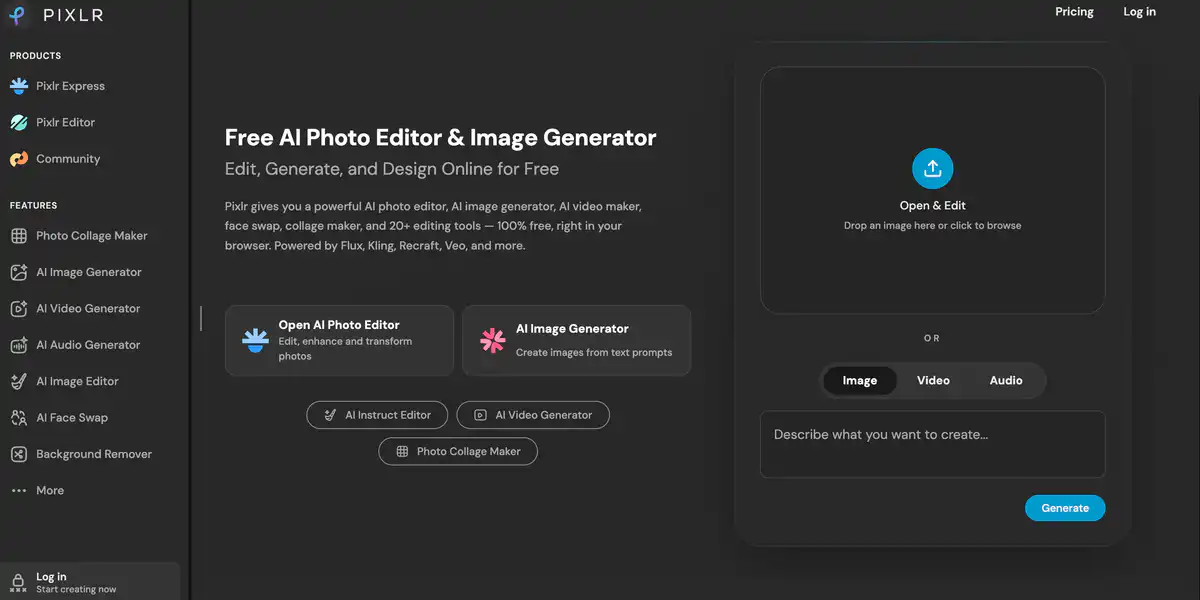
Site Overview
Pixlr is a suite of free online AI image editors that also offers AI image generation and short video tools.
For everyday image editing, background removal, and social media graphics, the learning curve is much lower than Photoshop. From the lightweight Express to the more full-featured Editor, beginners can get started quickly.
Core Features
1. Online photo editing + AI quick actions
Brightness and contrast, filters, text, collages, and portrait retouching are all available.
It also includes AI background removal / online cutout, object removal, denoising, and super-resolution upscaling.
2. AI image generation and generative editing
It supports text-to-image and image-to-image generation, as well as generative fill, outpainting, and natural language image editing.
On the model side, it integrates Flux, Recraft, Stable Diffusion, and others, depending on what is currently available on the site.
3. AI video and audio capabilities
It supports text-to-video / image-to-video, such as Kling and Google Veo.
It also offers face swap, text-to-speech, speech-to-text, and text-to-music.
4. Available on multiple platforms, with a clearly divided product line
Pixlr Express is geared toward quick edits, while Pixlr Editor is more oriented toward advanced layer editing.
For education, the official site also provides an education program, including free education benefits.
Pricing
- Free to use: The official description states that the free version is sufficient for everyday use. Advanced assets, more AI features, and ad removal are available through paid plans.
- Paid plans (official pricing)
- Plus: About $2.49/month, or about $1.99/month billed annually — ad-free, unlimited saves, 1 concurrent AI job, and about 80 AI Credits/month
- Premium (most common plan): About $9.99/month, or about $7.99/month billed annually — all models, 4 concurrent jobs, about 1000 Credits/month, private generation, font and template library, and more
- Ultra: Starting from about $24.99/month (or from about $19.99/month billed annually) — higher quotas, priority queue, extended export options, and more. There is also an Ultra MAX plan with even higher quotas.
Pricing may change. Please refer to the website: https://pixlr.com/pricing/
Comparison with Similar Platforms
Unique Advantages
- Photo editing + AI generation + video/audio are bundled in one platform, creating a short workflow for social media content.
- Easy to get started. Express leans toward templates and quick edits, which is friendlier than a pure Photoshop workflow.
- Low entry price for paid plans. Plus is only about two dollars per month when billed annually, suitable for light ad removal and a small amount of AI usage.
Practical Highlights
- Many AI tools: background removal, object removal, canvas expansion, face swap, and collages all in one place.
- The model list is updated frequently. Flux, Kling, Veo, and others can be selected directly on the site, depending on the current page.
Objective Limitations
- Heavy AI generation consumes a lot of Credits. Free and Plus quotas are relatively tight, so if you need to generate images every day, you will likely need Premium or credit packs.
- Complex commercial PSD work, plugin ecosystems, and top-tier professional retouching still fall short compared with desktop Photoshop or Photopea, which are more like “hardcore layer editors.”
| Comparison Item | Pixlr | Photopea | Adobe Photoshop |
|---|---|---|---|
| Positioning | AI editing + generation + short video | Web-based professional layer editing | Desktop professional retouching |
| Price Threshold | Free to use; paid about $1.99–$9.99+/month | Free to use; Premium about $5/month | Subscription-based, higher unit price |
| AI Generation | Strong (image/video/audio) | Available, but relatively restrained | Strong (Firefly, etc.) |
| PSD / Layer Depth | Enough for daily use, more user-friendly | Stronger PSD open/save support | Native and strongest |
FAQ
Q1: Is Pixlr really free? Will it force payment when saving?
A: Basic online photo editing can be used for free. The main value of Plus/Premium is removing ads, lifting save restrictions, and increasing AI quotas.
Q2: How is it different from Photoshop?
A: Pixlr is more like an “easy-to-use online Photoshop + AI toolbox.” It is quick to learn and fast for generation. For extremely complex retouching and commercial plugin ecosystems, Photoshop is still more reliable.
Q3: How are AI Credits deducted? What happens when they run out?
A: Text-to-image, generative fill, video, and similar features consume credits. Subscription quotas reset monthly, and you can also buy Credit Packs. Consumption varies by model and quality.
Q4: Should I choose Express or Editor?
A: For quick edits, filters, collages, and one-click AI tasks, use Express. For a workflow closer to professional layer editing, use Editor.
Q5: Can it create AI videos? Can I use it on mobile?
A: Yes, the official site offers text-to-video and image-to-video. Web, iOS, Android, and desktop are all supported, and subscriptions generally work across devices.
Q6: Is it suitable for small businesses and content creators?
A: Very suitable. Product cutouts, posters, social media graphics, and simple AI image generation can all be done in one workflow, without first learning an entire Photoshop skill set.
Q7: Are there discounts for education users?
A: Yes. The official website states that Pixlr is free for Education. Specific eligibility and activation methods should be confirmed on the education page or in account instructions.