
iLoveIMG
When you need image tasks done in the browser without installing anything, this is often the first stop. Compress, crop, convert, watermark, or remove backgrounds in bulk—same family as iLovePDF, and just as easy to pick up.
Site Introduction
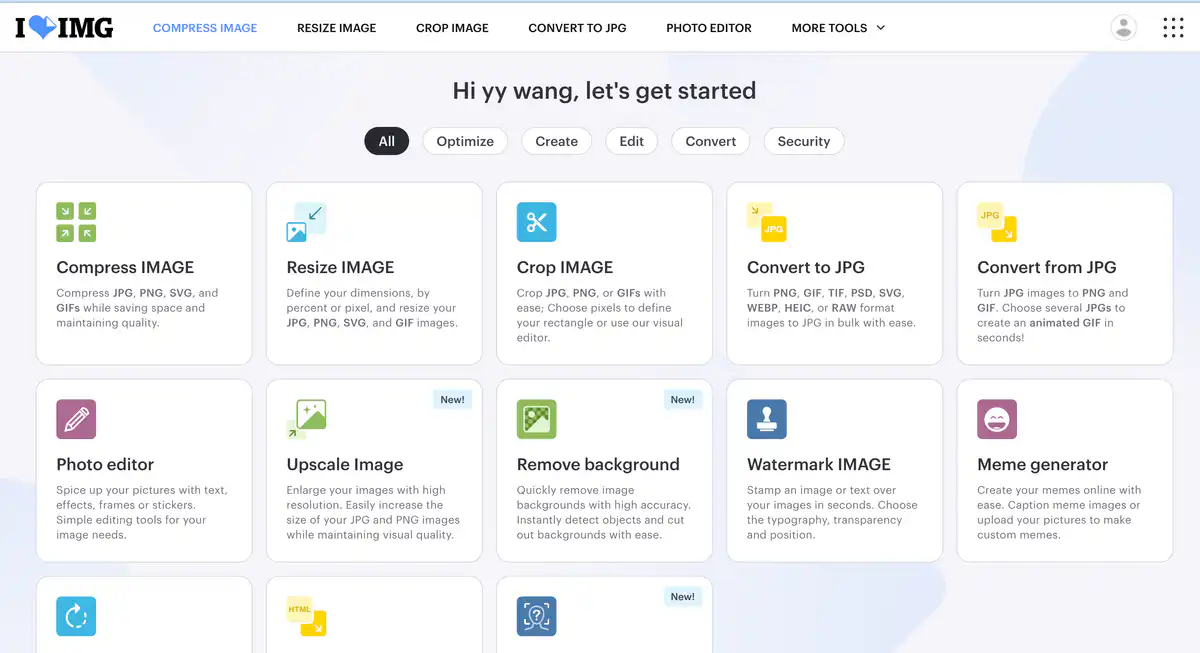
iLoveIMG is a suite of online image processing tools — it can compress, crop, convert formats, remove backgrounds, and add watermarks.
The free version already includes the core features. It is from the same company as iLovePDF — iLovePDF for documents and iLoveIMG for images, so the ecosystem is connected.
Core Features
1. Batch image compression and optimization
Supports batch compression of JPG, PNG, SVG, and GIF, automatically balancing file size and quality. The free version allows up to 30 images per batch and 200MB total per batch. You cannot manually adjust the compression level; after processing, it shows the compression ratio.
2. Format conversion
Convert to JPG: PNG, GIF, TIF, PSD, SVG, WEBP, HEIC, and RAW can all be converted. Convert to other formats: JPG can be converted to PNG and GIF, and multiple JPGs can also be combined into an animated GIF. This is very convenient when e-commerce assets, design drafts, and phone photos have inconsistent formats.
3. AI image tools
- Remove background: one-click cutout and background removal
- Upscale Image: AI upscaling for JPG/PNG while preserving clarity as much as possible
- Blur face: one-click blurring of private information such as faces and license plates
Premium includes 2,000 AI Credits, giving more generous usage for AI features.
4. Editing and utility tools
Crop, resize, rotate, add watermarks, online photo editing, meme generation, and HTML to JPG/SVG conversion. Supports direct transfer from Google Drive and Dropbox, and you can save the processed files back to the cloud.
Pricing Model
Web Tools (Personal)
| Plan | Price | Main allowances |
|---|---|---|
| Basic (Free) | $0 | Basic tools; compression/resize/conversion etc. up to 30 images per batch, 200MB per batch |
| Premium | $5/month (billed annually at $60) or $9/month (billed monthly) | All tools; up to 120 images per batch, 4GB per batch; no ads; 2,000 AI Credits; priority support |
| Business | Contact sales | Teams of 25 or more; includes SSO, dedicated account manager, custom contract |
Developer API (iLoveAPI)
| Item | Description |
|---|---|
| Free quota | 2,500 Credits per month after registration |
| Image compression | 2 Credits/image |
| Background removal | 10 Credits/image |
| Image upscaling | 20 Credits/image |
| After exceeding | Subscription or prepaid credit packs, pay-as-you-go billing |
Pricing may change; please refer to the official website:
- Web tools: https://www.iloveimg.com/pricing
- Developer API: https://developer.iloveimg.com/pricing
Comparison with Similar Platforms
Unique advantages
- Comprehensive toolset — compression, conversion, editing, AI cutout, watermarking, and HTML-to-image are all on one site, so you don't need to switch between tools.
- The same account system as iLovePDF and iLoveSign, so documents + images + signatures can be used together.
- Supports 30+ languages, including Simplified Chinese; ISO27001 certified, HTTPS transfer.
Practical highlights
- Connect to Google Drive / Dropbox, so cloud files don't need to be downloaded locally first.
- The free version can batch process 30 images at a time, which is friendlier than many tools that only allow one image at a time.
Objective limitations
- The free version has ads, and batch limits and file size limits are relatively tight; heavy users will eventually need to pay.
- Images must be uploaded to servers for processing and are automatically deleted after 2 hours — for privacy-sensitive material, you need to weigh the risks yourself; compression parameters cannot be adjusted, so users who want fine-grained control may find it insufficient.
Comparison with similar tools
| Comparison item | iLoveIMG | TinyPNG | Remove.bg |
|---|---|---|---|
| Positioning | All-in-one image toolkit | Focused on compression and optimization | Focused on AI cutout |
| Free quota | 30 images at a time, 200MB per batch | 20 images at a time, 5MB per image | Limited free uses |
| Core strength | Batch compression + conversion + editing | Strong compression algorithm, good AVIF/WebP support | High cutout accuracy |
| AI features | Background removal, upscaling, face blur | None | Cutout only |
| Format support | JPG/PNG/GIF/SVG/WEBP/HEIC/RAW etc. | AVIF/WebP/PNG/JPEG/JXL | Common raster formats |
| Paid starting price | $5/month (annual billing) | Web Pro $39/year | Around $9/month |
| Privacy | Cloud processing, deleted after 2h | Cloud processing, deleted after 48h | Cloud processing |
FAQ
1. Is iLoveIMG really free?
Basic features are free, and some tools can be used without registering. The free version has per-batch limits (for example, 30 images per batch for compression) and file size limits (200MB per batch for most tools), plus ads. To process large batches, remove ads, and use all AI features, you need Premium.
2. Can I adjust the image quality after compression?
No. The compression level is fixed, and the system automatically balances file size and quality. After processing, it tells you what percentage was reduced, but there is no manual slider for fine-tuning.
3. Are uploaded images safe?
Transfer uses HTTPS, and the platform is ISO27001 certified. Files are deleted from the server within 2 hours after processing and are not retained long-term. For confidential or client material, it is recommended to evaluate before uploading.
4. What happens if I exceed the free version limits?
You won't be charged secretly. If you exceed the batch count or file size, the page will prompt you directly and ask you to upgrade to Premium. The official FAQ states that "it is technically impossible to exceed the quota."
5. What is the difference between Premium and the free version?
Mainly: the batch size increases from 30 to 120 images, the per-batch size increases from 200MB to 4GB, ads are removed, all tools are unlocked, 2,000 AI Credits are included, and there is priority support and regional processing options.
6. Can it connect to Google Drive?
Yes. It supports pulling files directly from Google Drive and Dropbox, and saving processed files back. There are also mobile apps (iOS / Android).
7. Which should I use compared with TinyPNG?
If you only want to focus on compressing images and pursue the smallest file size, TinyPNG's algorithm is more specialized. If you need a one-stop solution for cropping, converting, watermarking, and cutout, iLoveIMG is more convenient — one site handles everything without opening five tabs.