
Bang Xiaomang
The toolbox you bookmark and never remove. ID photos, PDF convert, OCR—one click away. Tencent QQ Browser’s online utility hub; most tools free.
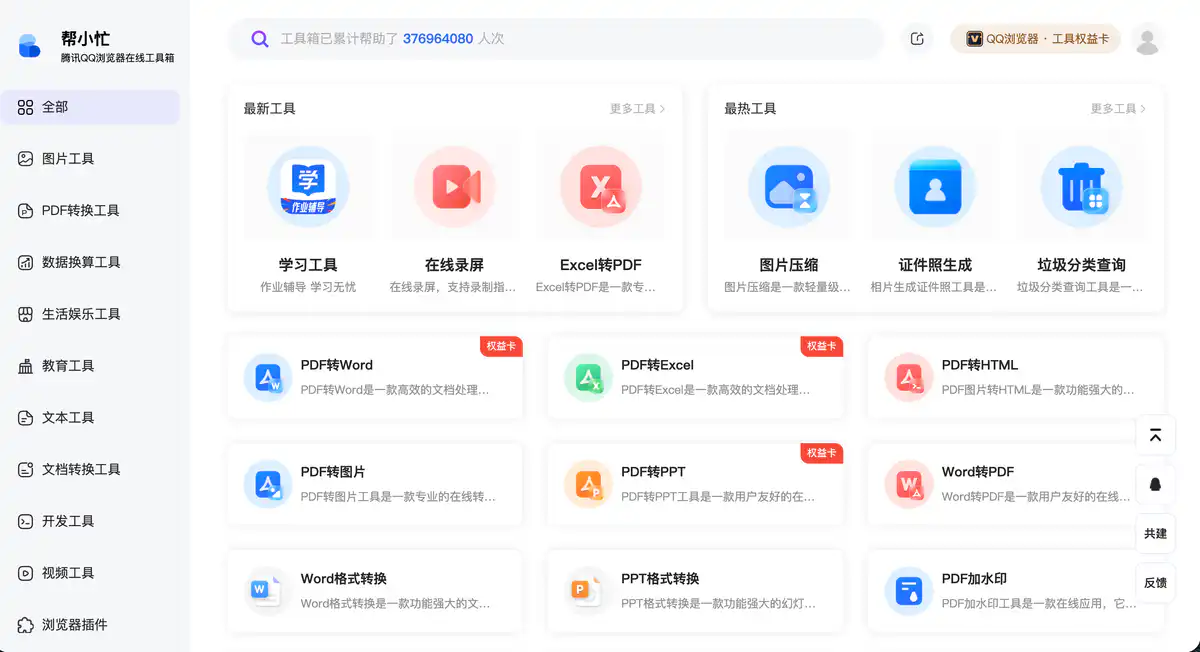
Site Introduction
Bangxiaomang (tool.browser.qq.com) is an online toolbox launched by Tencent QQ Browser, offering over 100 small tools all usable in the browser.
You can compress images, convert to PDF, create ID photos, and calculate mortgages simply by opening the webpage. For office workers handling files on the fly and students adjusting formats before submitting assignments, it can handle it all.
Core Features
1. Image Tools: Compression, ID Photos, and Editing in One Place
Image compression intelligently reduces file size, so you don't have to worry about oversized files when sending via WeChat or email.
The ID photo generator can change background colors and adjust sizes online, suitable for marriage registration, visa applications, and school enrollment. There are also an image editor, nine-grid cutter, moiré pattern remover, portrait segmentation, anime filter, and more, so you don't need to open Photoshop for photo editing.
2. PDF Suite: Conversion, Merging, and Splitting All Available
PDF to Word / Excel / PPT / Image / HTML is supported, and reverse conversion from Word and PPT to PDF is also possible.
There are also PDF merge, split, watermark, compression, encryption/decryption, page numbering, and page management tools. Common PDF operations in the office basically don't require separate software.
3. OCR Recognition + Document Processing
A large number of OCR tools are marked as "limited free": ID cards, bank cards, handwriting, printed text, passports, business licenses, business cards, waybills, and more. You can extract text by taking a photo.
Remove Handwriting can erase handwriting from test papers, and Document Scan converts paper documents into Word. Invoice extraction and express information extraction are also commonly used by finance and administrative staff.
4. Life / Development / Education Miscellaneous Toolbox
Life: garbage sorting, what to eat today, kinship calculator, express tracking, calorie query, mortgage calculator.
Development: JSON formatter, Base64 encoding/decoding, regex validation, UUID generator, timestamp conversion.
Education: copybook generator, university search, idiom dictionary, periodic table. There are also online screen recording, video to GIF, Markdown editor, and more, with comprehensive categories.
Pricing Model
Most tools are free, and a few advanced features require a "Rights Card".
The vast majority of tools on the homepage can be used directly without registration. Image compression, ID photo generation, garbage sorting, PDF merge/split, JSON formatting, and the like are sufficient for daily free use.
Features labeled with "Rights Card" include: PDF to Word / Excel / PPT, Image to Excel, Text Extraction, Invoice Extraction, Document Scanning, and others. According to third-party tests, the Rights Card is inexpensive, at the level of a few yuan, and the specific price is subject to the display within the tool.
Pricing may change. Please refer to the website: https://tool.browser.qq.com/
Comparison with Similar Platforms
Unique Advantages
- Tencent official, with a large number of tools (100+), covering multiple scenarios such as office, life, and development in one site.
- Browser-based, no client installation required, with deeper integration for QQ Browser users.
- High proportion of free tools; image compression, ID photos, and basic PDF operations are completely sufficient for ordinary users.
Practical Highlights
- Tools are organized into 11 major categories, with latest/hottest rankings to help you find tools quickly.
- Integrates Tencent capabilities such as Tencent Manager security detection and Tencent E-sign contract verification.
Objective Shortcomings
- High-frequency features like PDF to Word require a Rights Card; heavy office users will eventually need to pay.
- Some OCR limited-free features have usage caps; batch processing is not as good as professional OCR software.
- Many features but depth is not as good as specialized professional tools (such as Photoshop, Adobe Acrobat).
Comparison with Similar Sites
| Comparison Item | Bangxiaomang | Smallpdf | tool.lu |
|---|---|---|---|
| Developer | Tencent QQ Browser | Overseas commercial company | Domestic individual/team |
| Number of Tools | 100+ | Primarily PDF | 200+ |
| Free or Not | Mostly free | Limited free daily quota | Mostly free |
| Payment Model | Rights Card | Subscription membership | Some features restricted |
| Registration | Usually no registration | Some features require login | No registration |
| PDF Capability | Strong (conversion requires Rights Card) | Very strong | Basic |
| Special Features | Tencent ecosystem, comprehensive OCR, many life tools | PDF professional | Comprehensive developer tools |
FAQ
1. Is Bangxiaomang really free?
Mostly free. Image compression, ID photos, PDF merge/split, calculators, JSON formatting, and more can be used directly. Features marked with "Rights Card", such as PDF to Word, text extraction, and invoice extraction, require additional purchase.
2. Do I need to register or download QQ Browser?
No registration is required. Open the official website in any modern browser and use it. QQ Browser users may have a smoother experience, but it is not a mandatory requirement.
3. What is a Rights Card? How much does it cost?
A Rights Card is a paid credential for advanced features on the site, used for core conversions such as PDF to Word. Third-party feedback indicates that a few yuan can cover single-use or short-term needs, and the specific price is subject to the tool page display.
4. What is the difference between "limited free" and "Rights Card"?
Limited free = free for a limited time or limited number of uses, such as being able to use OCR recognition a few times per day. Rights Card = clearly marked paid features; without purchasing a card, you cannot use them or can only use them very few times.
5. Are uploaded files secure?
This is an official Tencent product, and the footer contains a privacy policy and data processing rules. For sensitive files (ID cards, contracts), it is still recommended to delete them promptly after processing and not leave them on third-party servers for a long time.
6. How good is the PDF to Word conversion?
It is basically sufficient for everyday documents and scanned files, though complex layouts may require manual fine-tuning. For heavy PDF editing, Adobe is still more professional. Bangxiaomang's advantage is free + convenient.
7. Compared with Smallpdf and iLovePDF, which should I choose?
Occasional use, wanting to spend less → Bangxiaomang (many free tools). Professional PDF batch processing, stable OCR → subscription services like Smallpdf. Developer tools → tool.lu is also worth a visit.