
DataTool
Hunting down clips across TikTok, Douyin, or Instagram gets old fast without a reliable downloader. Paste a link for watermark-free saves up to 4K, batch parsing, subtitle extraction, and AI transcription—via web, browser extension, or desktop app.
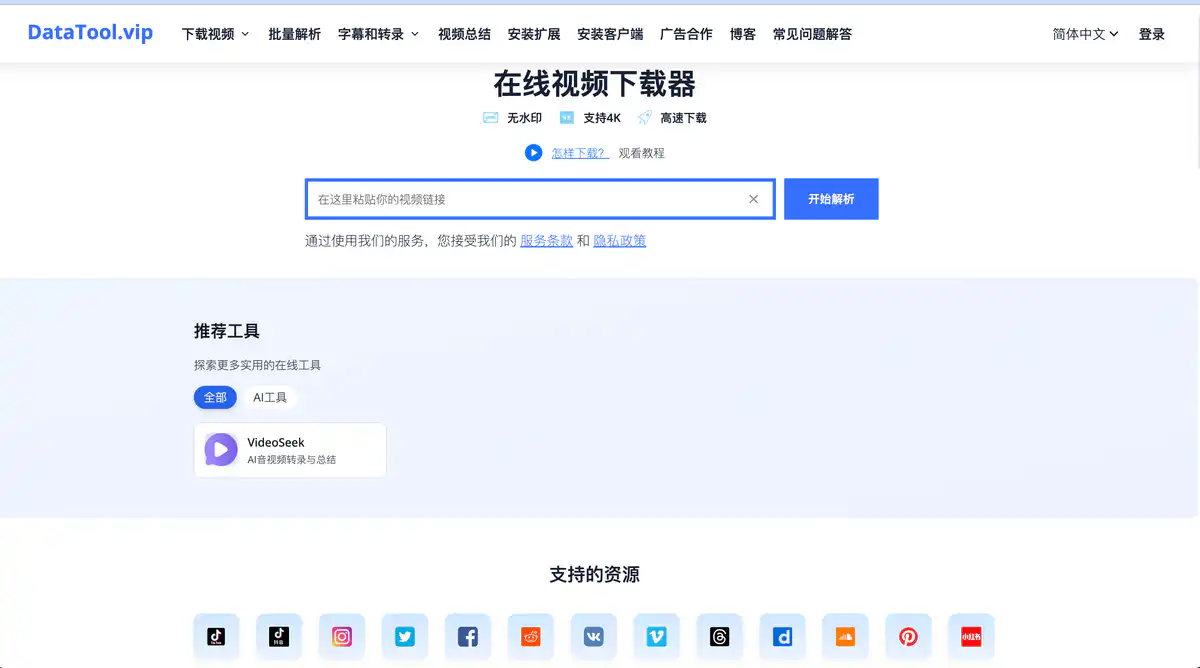
Site Overview
DataTool.vip is an online video download tool — paste a link and it will parse and save the video. It focuses on watermark-free downloads, 4K high definition, and fast parsing, covering TikTok, Douyin, YouTube, Bilibili, Instagram, Twitter/X, and Facebook. It is suitable for content creators and operations staff who want to back up favorite videos or batch-grab footage.
Core Features
1. Multi-Platform Online Parsing and Downloading
On the homepage, enter a video link and click Start Parsing. Supports TikTok download, Douyin video download, YouTube download, Bilibili video download, Instagram, Twitter/X, Facebook, OnlyFans, Vimeo, and more. You can choose different resolutions, up to 4K video download, with watermark-free download by default.
2. Batch Processing and Audio-Video Merging
Batch Parse is suitable for processing multiple links at once. The desktop client supports merging separate audio and video streams for YouTube and Bilibili, solving the problem of split audio and video on some platforms. The extension can also batch download images and videos, suitable for image-and-text platforms like Xiaohongshu and Instagram.
3. Subtitle Extraction and AI Transcription Summary
Provides subtitle extraction and AI transcription summary, supporting YouTube, Bilibili, TikTok, and more. It can convert video content into text, and with AI video summary quickly extract key points. There is also a related product VideoSeek AI, focused on audio/video transcription and summarization. This section indicates that Credits or VIP membership is required.
Pricing Model
- Basic online video download, watermark-free download: Free
- Subtitle extraction, AI video summary: Requires Credits or VIP (prices visible after login in the Purchase Center)
Pricing and quotas may change; please refer to the official website: https://www.datatool.vip/
Comparison with Similar Platforms
Unique Advantages
- Broad platform coverage: TikTok + Douyin + Bilibili + Xiaohongshu and other domestic and overseas platforms are all supported, friendly to Chinese users.
- Offers four forms: Web + Extension + Desktop + Android, with batch download and Bilibili/YouTube audio-video merging as differentiators.
- Basic downloads are free and unlimited, with a lower barrier than many competitors that allow only “2 times per day.”
Practical Highlights
- The extension can download with one click on social media pages without switching tabs and copying links back and forth.
- Supports 20+ languages for the interface, including Simplified Chinese, Traditional Chinese, Japanese, Korean, and more.
Objective Limitations
- VIP/Credits pricing is not transparent; prices for advanced features (subtitles, AI summary) are only visible after login.
- It says “subtitle download is not supported” in one place, but there is a separate subtitle extraction tool, which can be confusing about functional boundaries.
Side-by-Side Comparison
| Comparison Item | DataTool.vip | SaveFrom.net | SSSTikTok |
|---|---|---|---|
| Supported platforms | TikTok, Douyin, YouTube, Bilibili, Instagram, etc. | YouTube, Facebook, etc. | Focused on TikTok |
| Watermark-free | ✅ | Partially supported | ✅ |
| 4K download | ✅ | Depends on source video | Partially supported |
| Batch download | ✅ (extension/client) | ❌ | ❌ |
| Subtitles/AI | Subtitle extraction + AI summary (paid) | ❌ | ❌ |
| Client | Mac/Win/Android | None | None |
| Pricing | Basic free; advanced requires VIP | Free + ads | Free |
| Best for | Multi-platform, batch needs, Chinese users | Occasional YouTube downloads | TikTok only |
FAQ
1. What does DataTool.vip do?
An online video download service. Paste the video link into the input box, parse it, and save it locally. It supports watermark-free downloads, multiple resolution options (including 4K), and can also download directly on social media pages via extensions and clients.
2. Is it really free? Do I need to register?
Basic video parsing and downloading is free. The TikTok download page states no charge, no registration, unlimited uses. However, advanced features such as subtitle extraction and AI transcription summary require login and purchase of Credits or VIP. See the Purchase Center for specific prices.
3. Which platforms are supported?
The FAQ explicitly lists: YouTube, TikTok, Instagram, Twitter/X, Xiaohongshu, Douyin. The homepage and extension also mention Facebook, OnlyFans, Vimeo, Bilibili, etc. Supported ranges vary slightly across tools; refer to the respective feature pages for details.
4. Is there a watermark when downloading TikTok/Douyin videos?
No. DataTool focuses on watermark-free downloads. You can choose original quality, Full HD, HD, SD, etc., up to 4K (depending on the source video's resolution).
5. Can I use it on mobile?
Yes. The web version is optimized for mobile browsers, and there is an Android client. iPhone users can access the web version through Safari.
6. Is downloading videos legal?
DataTool requires users to use content only for personal, non-commercial purposes and to bear copyright responsibility themselves. The site states that it does not store or distribute video content; it only parses links. Before downloading others' works, it is recommended to confirm whether you have authorization.
7. What is the difference between the extension and the client?
The web version is suitable for occasional single downloads; the browser extension is suitable for one-click batch grabbing on pages like TikTok, Instagram, and Xiaohongshu; the desktop client is suitable for large batch tasks and also supports audio-video merging for YouTube/Bilibili.
8. How do I use subtitles and AI summary?
Go to the “Subtitles & Transcription” or Video Summary module, paste links from YouTube, Bilibili, TikTok, etc., to extract subtitles or generate an AI video summary. This section shows “Buy credits or VIP” and is a paid value-added feature.