
Mixkit
When a cut needs stock, this feels like an open drawer of assets. Free stock video, music, SFX and templates for personal and commercial use, no attribution required.





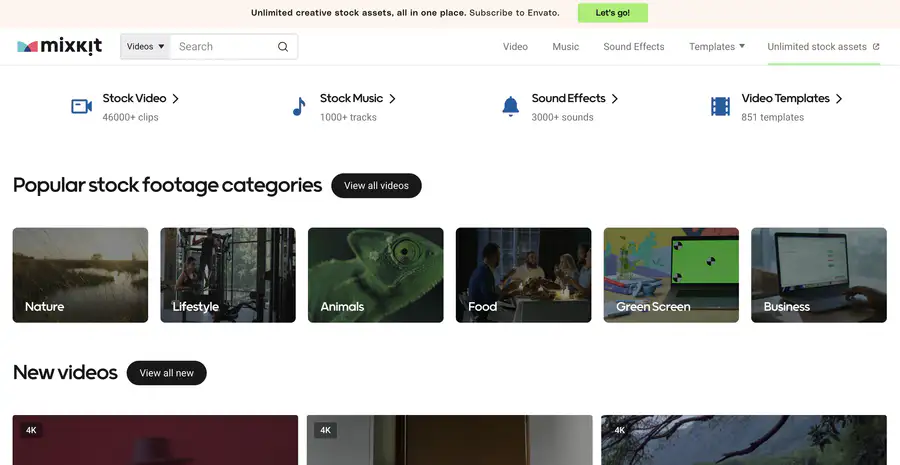
Site Overview
Mixkit is a free asset library under Envato, built specifically for video editing.
Stock videos, free music, a sound effects library, and video templates can all be downloaded for free; most require no attribution, and registration is not mandatory.
Core Features
1. A large volume of free video assets, with easy filtering for 4K and vertical
The site has a large number of watermark-free clips covering nature, lifestyle, business, and other subjects. You can filter by 4K video and vertical video, making it convenient for both short-form vertical videos and widescreen productions.
2. Background music and sound effects are all in one place
Besides visuals, there are background music tracks and commonly used sound effects. For editing and scoring, you don't need to search three or five other sites; short video assets and audio can be gathered in one place.
3. Templates for Premiere, AE, Final Cut, and more are available for direct download
It offers Premiere Pro templates, After Effects, Final Cut Pro, DaVinci Resolve, and other video templates. For opening titles, transitions, lower thirds, and similar intro effects, you can avoid building everything from scratch.
4. Licenses are clearly written by type; check the matching one before commercial use
Most resources use the Mixkit Free License and are commonly available for personal and commercial use. The licensing details for music, video, and templates differ, and some individual items may be Restricted; checking the corresponding license before downloading is safer.
Pricing Model
Core resources on the site are free, with unlimited downloads
If pricing changes, please refer to the official site and license page: https://mixkit.co/ , https://mixkit.co/license/
Comparison with Similar Platforms
Unique advantages
- Video-oriented assets are concentrated: not just images—free video assets, music, sound effects, and templates are bundled together.
- Extremely low barrier: no registration required and a clear royalty-free orientation, so you can start editing quickly.
- Templates fit mainstream editing software: more convenient for people who regularly use Premiere and AE.
Practical highlights
- New footage is added weekly, so it is not all an old library.
- The homepage categories are clear, making needs such as transitions, green screen, and vertical backgrounds easy to locate.
Objective shortcomings
- Volume is smaller than all-category large libraries: compared with the breadth of Pexels and Pixabay image libraries, Mixkit leans more toward video creation scenarios.
- Licensing has category restrictions: for example, free music generally cannot be used directly in games, television broadcasts, or redistributed as-is; it cannot be resold as unprocessed stock material.
Comparison with similar sites
| Site | Resource focus | Degree of free content | Standout features |
|---|---|---|---|
| Mixkit | Video, music, sound effects, editing templates | Free | Video-project friendly, broad software template coverage |
| Pexels | Mainly free images and videos | Free | Solid reputation for images and videos, clear commercial-use rules |
FAQ
Q: Is Mixkit really completely free? Do I need an account? A: The core free library can be downloaded directly, and the official site emphasizes that registration is not required. The paid line is Envato Elements; don't confuse it with Mixkit's free pages.
Q: Can it be used in commercial ads and client productions? A: Resources under the Free License generally allow commercial projects. Specific items are subject to that resource's license; Restricted items are for personal non-commercial use only.
Q: Is attribution required? A: The Free License generally does not require attribution. Writing a source credit is nicer, but it is not a hard requirement.
Q: Can the music be used freely on all channels? A: Not entirely. Free music is commonly usable in web, social media, and advertising productions, but it is usually not applicable to disc releases, video games, television, or broadcast; read the original music license before downloading.
Q: How do I use the templates after downloading? A: Choose the corresponding template for Premiere, AE, Final Cut, or DaVinci based on your software, import the project, and then change the text and assets—suitable for quickly producing intros and transitions.
Q: What is the relationship with Envato Elements? A: Mixkit is produced by Envato and positioned as a free entry point; Elements is a separate paid unlimited-download service. For free editing, checking Mixkit first is often enough.