
iconfont
When Chinese product teams need icons, this is usually the first tab they open. An Alibaba Mama vector icon and illustration hub—download icons in multiple formats, or turn them into icon fonts for the front end.





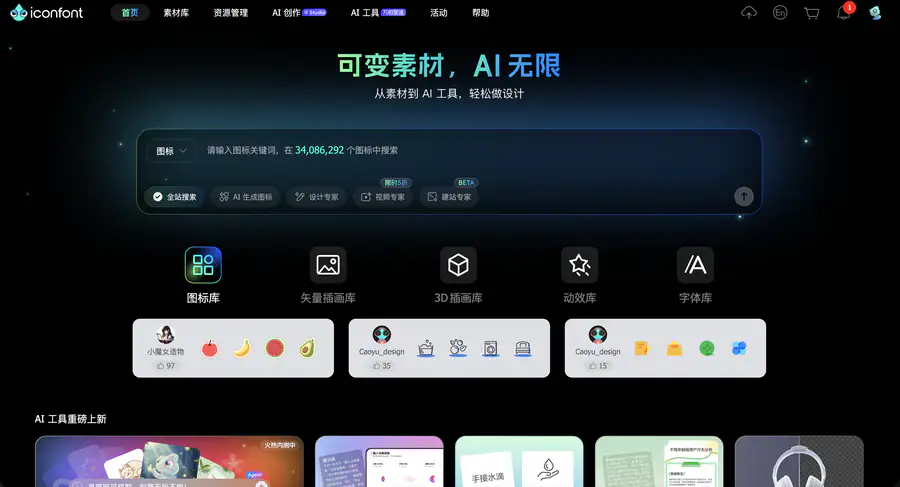
Site Overview
iconfont is Alibaba's vector icon library, where designers upload icons and everyone can search and use them.
A massive collection of illustrations and vector icons can be downloaded, and they can also be added to projects and turned into font icons, making it easy for front-end developers to change size and color.
Core Features
1. Fast Chinese icon search, with style filters
Find UI icons by keyword, with support for Chinese, English, and pinyin. Styles such as linear, filled, flat, and hand-drawn can be filtered, and free icons and icon assets are plentiful.
2. Download individually or add to a project, with full format coverage
Individual icons can be downloaded as SVG, PNG, or AI. A common approach is to add them to a project for unified management, which suits set-based icon downloads and long-term maintenance.
3. One-click font icon generation, with three reference methods
Projects can be converted into icon fonts, supporting Unicode, Font Class, and Symbol references. The official recommendation leans toward Symbol, which also works well with multi-color SVG icons, and you can use Alibaba CDN online links.
4. Beyond icons: illustrations and font libraries also have entry points
The site has also expanded into illustrations, Lottie animations, official font libraries, and more. Teams collaborate through "projects," with designers uploading images and front-end developers integrating code, so icon management runs in one line.
Pricing Model
Browsing and searching are free; downloading requires login; asset licensing is divided into free, paid, and open source
Pricing and licensing may change; please refer to the website: https://www.iconfont.cn/
Comparison with Similar Platforms
Unique advantages
- Smooth Chinese workflow: searching front-end icons, creating projects, and generating font icons are quick for domestic teams to pick up.
- Mature reference methods: Unicode / Font Class / Symbol all have documentation, and CDN hosting saves effort.
- Large UGC volume: a massive icon library uploaded by users means even niche terms can turn up a suitable draft.
Practical highlights
- The cart allows batch downloads of assets or code, gathering a basket of icons at once.
- The Symbol approach supports multiple colors, making it more flexible than pure monochrome font icons.
Objective shortcomings
- Commercial boundaries must be checked yourself: copyright belongs to uploaders; download pages and agreement wording are occasionally inconsistent, so be sure to check each item's license before commercial use.
- Downloads heavily depend on login: registration mainly uses mainland Chinese phone verification, and the experience for overseas accounts is average; the interface is also basically Simplified Chinese only.
Comparison with similar sites
| Site | Resource focus | Degree of free content | Standout features |
|---|---|---|---|
| iconfont | Chinese vector icons and font generation | Many free assets, some paid | Project collaboration + font icon CDN |
| IconPark | ByteDance open-source icon system | Open source and free | Consistent style, more oriented toward product design standards |
FAQ
Q: Can iconfont icons be used commercially directly? A: It depends on the asset labeling. For those marked "free to use," the agreement states that commercial use may be included; for those marked "paid to use," you need to contact the author first. Don't assume the entire site can be used commercially without thinking.
Q: Do I have to register to use it? A: Browsing and searching casually are fine. To actually download, favorite, or create projects, you generally need to log in.
Q: What is the easiest way for front-end developers to use it? A: If there are only a few icons, you can download SVG/PNG directly. For set-based maintenance, it is recommended to add them to a project, use Font Class or Symbol references, and then link to the project CDN.
Q: How is it different from Font Awesome? A: Font Awesome leans toward an international general-purpose icon set; iconfont is more suited to Chinese search and domestic collaboration, and the font icon generation pipeline is also more localized.
Q: What should I pay attention to when uploading my own icons? A: Organize them according to the specified artboard and path requirements, and public icon libraries usually need to pass review. Choosing free, paid, or open-source licensing directly affects whether others can use them with confidence.
Q: What if the online font link goes down? A: When the CDN is occasionally unavailable, you can switch to importing local font files; don't stake the production environment on a single external link.