
Baidu Translate
For travel emergencies, foreign articles, or paper deadlines, this is what many people open first. A veteran online translation hub that bundles text, document, image, and audiovideo translation in one place, with an enormous language list—premium tiers unlock extras, but everyday basics are covered.
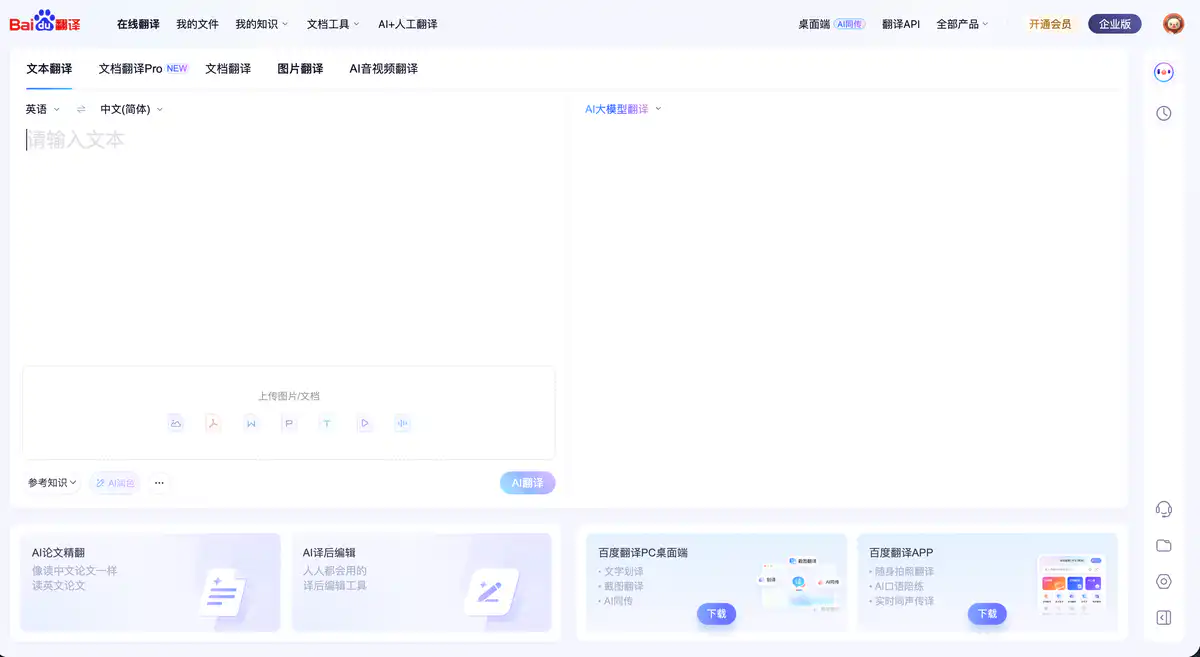
Site Overview
Baidu Translate (fanyi.baidu.com) is Baidu's online translation tool with the slogan "Your Super Translation Partner."
From daily word lookup, paper translation, and full PDF document translation to simultaneous interpretation during meetings, one entry point covers it all. It supports 200+ languages and nearly 40,000 translation directions, with seamless synchronization across web, desktop, and mobile app.
Core Features
1. Multimodal AI Translation
The homepage is divided into four main modules: Text Translation, Document Translation, Image Translation, and AI Audio/Video Translation.
Paste text directly into the text box, or upload images/documents. You can optionally use "Reference Knowledge," "Custom Instructions," and "Deep Thinking" to enable AI Translation mode, which is more context-sensitive than traditional machine translation.
2. Document Translation with Layout Preservation
Upload Word, PPT, Excel, PDF, and other formats with one click, view bilingual side-by-side comparison, and preserve the original layout as much as possible.
There is also AI Academic Paper Translation—reading English papers feels like reading the Chinese version—and AI Post-Editing—revise translations without switching back and forth between tools.
3. Desktop & App Scenario-Based Capabilities
- Desktop: Word selection translation, screenshot translation, AI simultaneous interpretation (real-time bilingual subtitles for online courses/drama watching/meetings)
- App: Camera translation (25 languages), AI speaking practice partner, real-time simultaneous interpretation (40+ languages)
No need to install a pile of software—one account syncs history across multiple devices.
4. Knowledge Management and Developer Ecosystem
Individual users can create termbases, translation memories, and knowledge bases, which are automatically referenced during translation.
Developers can use the Baidu Translate Open Platform to integrate translation APIs; enterprise users can choose the Intelligent Translation Enterprise Edition or private deployment.
There are also AI + Human Translation (daily quick translation, professional translation, native English polishing) and PDF tools (convert to Word/PPT, split, term extraction).
Pricing
Individual Users: Basic Features Free
- Core features such as Text Translation and Image Translation are available directly on web/App at no cost.
- Without logging in, only the last 10 history entries are kept; after logging in, the last 1 month is retained.
Developer API (for programmatic integration)
| Service | Free Quota (real-name authentication required) | Price after exceeding quota |
|---|---|---|
| Text Translation - General | Individual 5 million characters / Enterprise 10 million characters | ¥49 per million characters |
| Document Translation | Individual 1 million characters / Enterprise 5 million characters | ¥49 per million characters |
| Image Translation | 10,000 times | Pay-as-you-go |
| LLM Text Translation | Individual 1 million characters / Enterprise 2 million characters | Pay-as-you-go |
Prepaid character packages are also available (e.g., 10 million characters for ¥450).
Enterprise SaaS (Team Online Collaboration)
| Edition | Price | Minimum Order |
|---|---|---|
| Team | ¥99/month/person | 5 people minimum / annual payment |
| Enterprise Basic | ¥168/month/person | 10 people minimum / annual payment |
| Enterprise Standard | ¥279/month/person | 15 people minimum / annual payment |
| Enterprise Premium | Customized on demand | Contact sales |
Each edition differs in AI translation characters, machine translation quota, AI audio/video duration, etc. See the Enterprise Edition pricing page for details.
Prices may change; please refer to the website: https://fanyi.baidu.com/ (individual membership) / https://fanyi-api.baidu.com/b2b-products (enterprise edition)
Comparison with Similar Platforms
Unique Advantages
- Most comprehensive features: Text, document, image, audio/video, simultaneous interpretation, speaking practice, academic paper translation, and post-editing—all in one platform.
- Strong in Chinese scenarios: Built-in authoritative dictionaries such as Oxford and Collins; termbase + translation memory are friendly for professional translation.
- Complete ecosystem: Individual free use → membership upgrade → enterprise SaaS → API → private deployment, covering needs from light to heavy.
Practical Highlights
- Desktop word selection translation: No need to copy and paste when reading foreign-language materials; just select and translate.
- AI simultaneous interpretation + subtitle export: Watch raw videos, take online courses, or hold international meetings with real-time bilingual subtitles that can also be exported for review.
Objective Drawbacks
- Advanced individual features (such as Document Translation Pro and unlimited export) require a membership; the free version has limits on document volume and export count, so heavy users will eventually need to pay.
- For less common languages and literary translation, reputation is still slightly inferior to DeepL; in professional legal/medical scenarios, machine translation results still require manual proofreading.
Comparison Table
| Comparison Item | Baidu Translate | Youdao Translate | DeepL |
|---|---|---|---|
| Positioning | All-scenario AI translation platform | Learning + translation tool | High-quality machine translation for European languages |
| Language Support | 200+ languages | 100+ languages | 30+ languages (high accuracy) |
| Free Version | Basic text/image translation available | Basic features free | Free with character limits |
| Special Features | Simultaneous interpretation, academic paper translation, post-editing | Screenshot translation, AI polishing | Writing style adjustment |
| Document Translation | Supported, Pro requires membership | Supported, VIP unlock | Supported with Pro version |
| Suitable Users | Students, professionals, developers, enterprises | Students, daily users | Users pursuing translation quality |
FAQ
1. Is Baidu Translate free?
Basic translation is free. Daily features such as text and image translation can be used without paying. Advanced capabilities such as bulk document translation, AI simultaneous interpretation, and academic paper translation usually require a membership or enterprise edition. Please refer to the "Membership" page for details.
2. How to choose compared with Google Translate and DeepL?
For daily Chinese-English translation, reading papers, and translating documents, Baidu Translate offers more comprehensive features and a better Chinese experience. If you pursue literary quality in European languages, DeepL may be smoother. Google Translate covers many languages but access in China can be unstable. Choose based on the scenario—no need to stick to just one.
3. Can document translation preserve PDF layout?
Yes. After uploading, the system tries to preserve the original layout as much as possible and supports bilingual side-by-side viewing and export. For complex scanned documents or mixed image-text PDFs, results may vary by file; it is recommended to manually review after translation.
4. How can developers integrate the translation API?
Go to the Baidu Translate Open Platform, register a developer account, and enable the corresponding services. After individual real-name authentication, text translation can receive up to 5 million characters of free quota. The Standard API even has no character limit (QPS of only 1), suitable for low-frequency calls.
5. How long is history retained?
Not logged in: last 10 entries. After logging in: recent 1 month. Important translations should be exported promptly or saved to "My Files."
6. How to use AI simultaneous interpretation?
Download the Baidu Translate desktop app, start AI simultaneous interpretation during meetings, online courses, or video watching, and it will generate real-time bilingual subtitles, supporting 40+ languages. The content can also be exported for note-taking. The mobile app also supports real-time simultaneous interpretation.
7. Which edition is suitable for enterprise teams?
A small team of 5 should consider the Team edition (¥99/month/person); if you need knowledge collaboration and editable export of images, start with Enterprise Basic; for large translation volume and dedicated services, choose Enterprise Standard or Premium. All editions can be tried online—if unsure, try the free experience first before deciding.