
DeepSeek
Looking for a capable Chinese LLM without hunting for mirrors—DeepSeek Chat is many people's go-to. Free web chat with deep thinking, web search, coding, and strong reasoning across the R1/V line. No consumer subscription—API calls are billed separately.
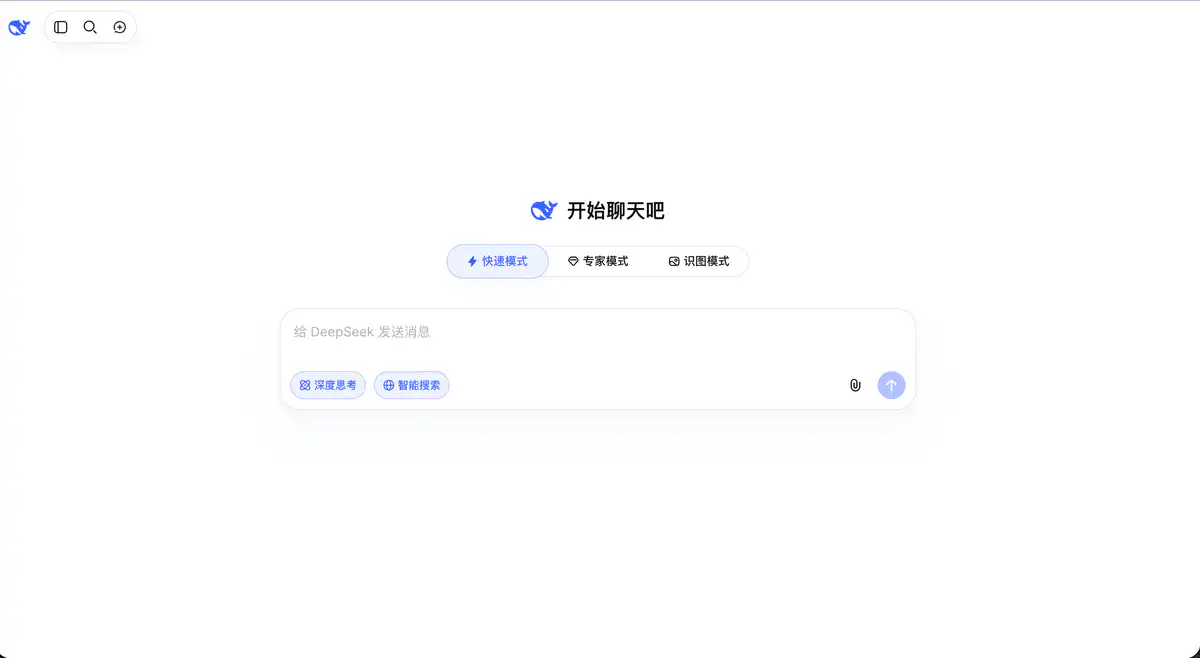
Site Overview
DeepSeek Chat (chat.deepseek.com) is the web-based AI chat interface launched by DeepSeek. You can use it right after registration, and it is completely free for individual users. It excels at Chinese-language Q&A, code generation, mathematical reasoning, and long-document analysis. Above the input box, you can switch between Quick Mode / Expert Mode / Image Recognition Mode, and you can also enable Deep Thinking and Smart Search.
Core Features
1. Multi-Mode Conversation: Quick Q&A vs. Deep Reasoning
Quick Mode is the default, with fast responses, suitable for daily chat, translation, and simple writing. Expert Mode uses a more powerful model, delivering more stable performance for math and logic, complex programming, and long-form analysis, though there may be queues during peak hours. Image Recognition Mode supports image understanding. In the input box, you can also separately enable Deep Thinking, which makes the model reason first before answering — especially useful for solving math problems and debugging code.
2. Smart Search: Filling the Gap in Real-Time Information
Manually enable Smart Search (also called Web Search), and the model will incorporate the latest online information into its answers. For time-sensitive topics like news, policy changes, and product updates, it is more reliable than relying solely on training data. It does not cost extra, aligning with the positioning of a free AI tool.
3. File Upload and Long Context
Supports uploading PDF, Word, Excel, PPT, images, etc., with a single file limit of 100 MB. With a 1M Token context window, you can feed in a hundred-page report or a lengthy novel all at once for summarization and Q&A. Quick Mode focuses more on text recognition; for in-depth document reading, it is recommended to switch to Expert Mode before uploading.
4. Code, Writing, and Translation All in One
Code generation is one of DeepSeek's strengths, with proficiency in mainstream languages such as Python, JavaScript, and Go. It can also handle AI writing, translation, outline organization, and email polishing. The app version is synchronized and available, so you can have AI chat on your phone anytime.
Pricing Model
| Usage Method | Free? | Description |
|---|---|---|
| Web Version | ✅ Completely free | No conversation limits for individual users; Deep Thinking and Smart Search are free |
| DeepSeek App | ✅ Completely free | Available on iOS / Android app stores |
| API Open Platform | ❌ Pay-as-you-go | For developers/enterprises, billed by Token |
API Pricing (developer-facing, unrelated to regular users):
Refer to the official API pricing page. Main models:
| Model | Peak Input (Cache Miss) | Peak Output | Off-Peak Price |
|---|---|---|---|
| deepseek-v4-flash | $0.44 / million Tokens | $1.32 / million Tokens | Half of peak price |
| deepseek-v4-pro | $1.32 / million Tokens | $3.96 / million Tokens | Half of peak price |
Peak hours are UTC Monday to Friday 01:00–04:00 and 06:00–10:00 (approximately Beijing time 9:00–12:00 and 14:00–18:00). Starting August 23, 2026, weekends are billed at off-peak prices all day.
RMB reference (peak): V4-Flash input about 3 yuan, output about 9 yuan; V4-Pro input about 9 yuan, output about 27 yuan (per million Tokens).
Prices may change; please refer to the official website for API pricing: https://api-docs.deepseek.com/quick_start/pricing
Comparison with Similar Platforms
Unique Advantages
- Web/App completely free with no usage limits — rare among large language models of comparable performance.
- Reasoning and code are core strengths; Deep Thinking mode has a strong reputation in math, logic, and programming.
- The open-source strategy is aggressive, with public weights and an active developer community; API pricing has also remained low over the long term.
Practical Highlights
- 1M context allows long-document analysis without switching tools.
- The API is compatible with the OpenAI format; existing projects can integrate simply by changing the
base_url.
Objective Limitations
- Expert Mode may require waiting during peak hours, and responses are not as immediate as Quick Mode.
- Quick Mode and Expert Mode have different file upload capabilities, so you need to know which mode to use before uploading documents.
- It lacks the rich plugin ecosystem of ChatGPT; multimodal capabilities are still evolving.
Side-by-Side Comparison
| Comparison Item | DeepSeek Chat | ChatGPT | Kimi |
|---|---|---|---|
| Free for individuals | ✅ Completely free | Free tier has limits | Has free quota |
| Deep reasoning | ✅ Deep Thinking mode | o-series requires paid plan | Has thinking mode |
| Web search | ✅ Smart Search | Available in Plus | ✅ Web access |
| File upload | 50 files / 100MB | Supported in Plus | 50 files / 100MB |
| Context window | 1M Token | Varies by plan | Long context |
| Code ability | Very strong | Very strong | Good |
| API price | Extremely low | Relatively high | Medium |
| Best for | Limited budget, need reasoning and code | Most complete ecosystem | Long documents, Chinese search |
FAQ
1. Is DeepSeek Chat really free?
For individual users, the web version and app are completely free. There are no membership plans, and Deep Thinking and Smart Search do not cost extra. Developers are billed by Token only when using the API, which is a separate system from the chat web interface.
2. How do I choose between Quick Mode and Expert Mode?
For daily Q&A, translation, and simple writing → Quick Mode, instant responses. For complex math, long code, and in-depth analysis → Expert Mode, higher quality but possibly slower. For OCR on files, use Quick Mode; to read and analyze long documents thoroughly, switch to Expert Mode before uploading.
3. How do I enable web search?
There is a “Smart Search” toggle near the input box; turn it on before asking. It is suitable for looking up the latest news, stock prices, policies, and other content not covered by training data. If off, the model only uses its own knowledge base.
4. Are Deep Thinking and Expert Mode the same thing?
No. Expert Mode is a mode tab at the top that changes the overall model tier. Deep Thinking is a switch inside the input box that lets the model show its reasoning process before giving an answer. The two can be used together.
5. What are the file upload limits?
Up to 50 files, each 100 MB, supporting PDF, Word, Excel, PPT, images, etc. Quick Mode mainly recognizes text; for full-text summarization and in-depth Q&A, remember to switch to the appropriate mode first.
6. Is it worth switching from ChatGPT?
If you mainly do Chinese conversation, code, and mathematical reasoning, DeepSeek is free, capable, and highly cost-effective. ChatGPT has a more mature ecosystem of plugins, GPTs, and multimodal features. Many developers use both: DeepSeek for daily chat and ChatGPT for specific ecosystem needs.
7. How do developers access the API?
Go to the DeepSeek Open Platform, register, and apply for an API Key. The API is compatible with the OpenAI format; set base_url to https://api.deepseek.com, and use model names deepseek-v4-pro or deepseek-v4-flash. Billing is by Token, and failed calls are not charged.
8. Why are responses sometimes slower or queued?
Expert Mode may face compute resource constraints during peak hours (weekday mornings and afternoons), possibly requiring a wait. Switching to Quick Mode usually returns instant responses. API users are billed according to peak/off-peak pricing, and weekends are billed at off-peak rates all day, which is more cost-effective.