
iLovePDF
When you don't want heavy desktop software for PDF chores, this is where many people land by default. Merge, split, compress, and convert PDFs in the browser—with e-sign and OCR in the mix, the toolkit is broader than most rivals.
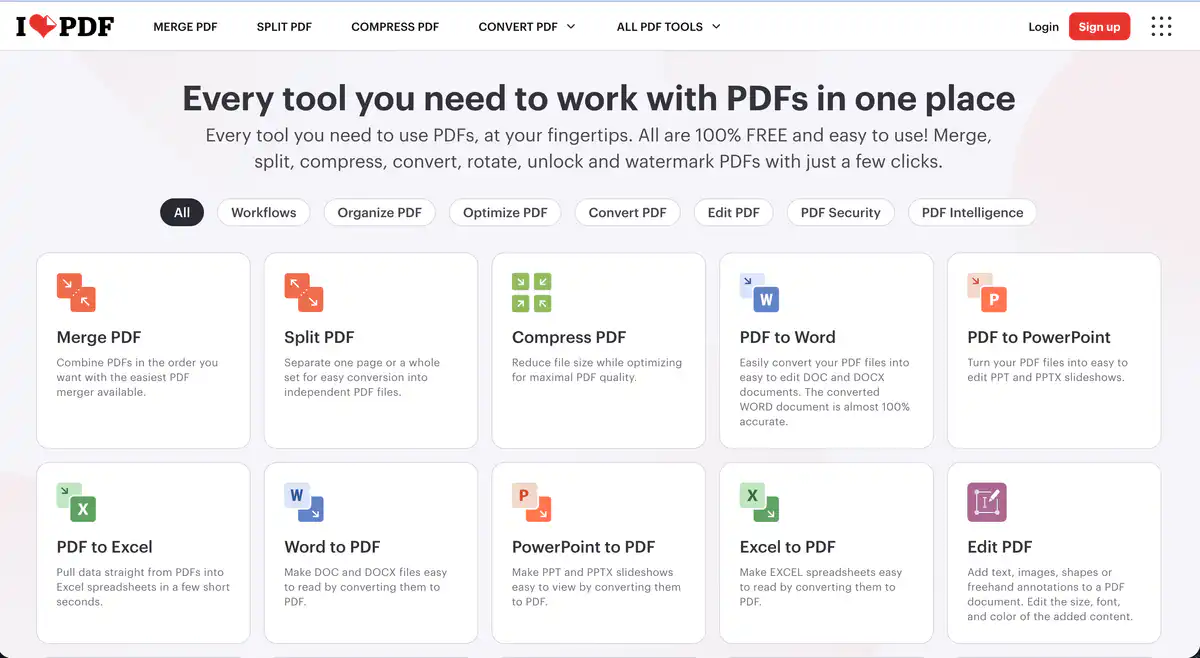
Site Overview
iLovePDF is an online PDF toolbox that brings together common operations such as merging, splitting, compressing, format conversion, editing, and signing in one place. No software installation is needed — just upload files in your browser. The free version handles everyday needs, while heavy users can upgrade to Premium.
Core Features
1. Basic PDF Processing: Merge, Split, Compress
PDF Merge, PDF Split, and PDF Compress are the three most frequently used tools. When merging, you can drag and drop to adjust page order; splitting supports cutting by page or by range; compression balances file size and quality. The free version has limits on usage count and file size, while Premium supports unlimited batch processing with files up to 4 GB each.
2. Format Conversion: Two-Way Office ↔ PDF
PDF to Word, PDF to Excel, PDF to PPT, as well as the reverse Word to PDF, Excel to PDF, and PPT to PDF are all supported. There are also PDF to Image, Image to PDF, and HTML to PDF. OCR-based conversion (scanned document recognition) is more complete in Premium; the free version allows OCR 1 time per day with a 15 MB file size limit.
3. Editing and Security: Edit Content, Add Watermarks, Lock and Unlock
Online PDF editing supports adding text, images, and annotations; PDF watermarking, rotating PDFs, cropping PDFs, and adding page numbers are all available. PDF encryption and PDF unlock are used to protect or remove passwords. There are also advanced features such as PDF redaction, PDF comparison, and PDF forms. Most tools in the free version are limited to 1–2 uses per day.
4. AI and Multi-Platform: Summarize, Translate, Workflow
The newer AI PDF summarization, PDF translation, and PDF to Markdown features are aimed at long documents and LLM workflows. Premium includes 2,000 AI Credits/month. There are also e-signatures and custom Workflows (chaining multiple steps together). It supports Web, iOS/Android mobile, and Mac/Windows desktop (Premium), and can connect to Google Drive and Dropbox.
Pricing Model
| Plan | Price | Key Points |
|---|---|---|
| Basic (Free) | $0 | Core tools available, limited per tool; single file size 15 MB–200 MB; ads; web only; no AI Credits |
| Premium | $5/month billed annually; $9/month billed monthly | All tools, unlimited processing, files up to 4 GB, Web/Mobile/Desktop, e-signature, Workflow, 2,000 AI Credits, no ads |
| Business | Contact sales for 25+ users | All Premium features + SSO, dedicated account manager, custom contract, regional file processing |
Free quota examples (based on the official comparison table; each tool is counted independently):
- Merge PDF: 25 times/day, 100 MB per file
- Compress PDF: 2 times/day, 200 MB per file
- PDF to Word: 1 time/day, 15 MB per file
- Image to PDF: 20 times/day, 40 MB per file
Education discount: Students or academic staff can apply for 1 year of Premium free (via the official Education program).
Pricing and quotas may change; please refer to the official website: https://www.ilovepdf.com/pricing
Comparison with Similar Platforms
Unique Advantages
- A wide variety of tools — 30+ PDF operations are centralized on one site, and the free version covers most everyday scenarios.
- Relatively generous free quotas — for example, merging is allowed 25 times per day, which is more usable than some competitors' “2 times per day.”
Practical Highlights
- Workflow can chain “Compress → Merge → Add Watermark” into a fixed process, saving time on repetitive tasks.
- Uploaded files are automatically deleted after 2 hours, and with HTTPS encryption, privacy awareness is solid.
Objective Limitations
- The free version has ads, and some advanced tools (PDF editing, OCR, AI features) have very limited usage or are restricted.
- It relies heavily on cloud processing, so wait times can be noticeable for large files or poor network conditions.
Side-by-Side Comparison
| Comparison Item | iLovePDF | Smallpdf | Adobe Acrobat Online |
|---|---|---|---|
| Free version | Yes, limited per tool | Yes, about 2 uses/day | Very limited, essentially requires subscription |
| Premium price | About $5/month billed annually | About $9–12/month billed annually | Individual plan about $20+/month |
| Number of tools | 30+ | 20+ | Professional-grade, Adobe ecosystem-oriented |
| Free file size limit | 15–200 MB | About 100 MB | Limited |
| AI features | Summary/Translation/Markdown | AI assistant (Pro) | Adobe AI Assistant (subscription) |
| Desktop offline | Premium desktop app | Pro desktop app | Full Acrobat desktop client |
| Best for | Limited budget, need full range of tools | Clean interface, light users | Professional layout, enterprise compliance |
FAQ
1. Is iLovePDF really free?
The free version (Basic) costs $0 and gives you access to core online PDF tools such as merging, compressing, and conversion, but each tool has its own usage count and file size limits, and pages include ads. It is completely sufficient for occasional use; if you process dozens of documents every day, you will need Premium.
2. How many files can the free version process per day?
There is no single “X files per day” limit; instead, quotas are counted separately per tool. For example, merge is 25 times/day, compress is 2 times/day, and PDF to Word is 1 time/day. See the pricing comparison table for details.
3. Is Premium worth buying?
If you frequently convert PDF to Word, need OCR recognition, have files that exceed the free version's 15–100 MB limit, or need e-signatures or AI PDF summarization, the $60 annual plan is more cost-effective than paying per use elsewhere. If you only use it once or twice a month, the free version is more economical.
4. Are uploaded files safe? How long are they kept?
Transfer is via HTTPS, and files are automatically deleted from servers within 2 hours after processing. The official website states compliance with GDPR and ISO 27001 certification. For sensitive or confidential files, local tools or enterprise-grade solutions are still recommended.
5. Which should I choose among iLovePDF, Smallpdf, and Adobe?
For light occasional use and a clean interface: Smallpdf is simpler, but its free quotas are tighter. Among free PDF tools, iLovePDF is friendlier in terms of variety and free usage counts. For professional publishing, complex layout, and enterprise compliance: the Adobe ecosystem is more suitable, but also more expensive.
6. How do the AI features (summary, translation, Markdown conversion) work?
They are Premium features with 2,000 AI Credits per month. They are suitable for quickly extracting key points from long PDFs, reading across languages, or exporting Markdown to feed into an LLM. In the free version, AI tools are limited to 1 use per day and 15–50 MB per file.