
GameFreer
When Steam prices sting, this one is already unzip-and-play. A blogger-run free game dump for PC and mobile—claims forever free, with direct links and cloud-drive downloads.
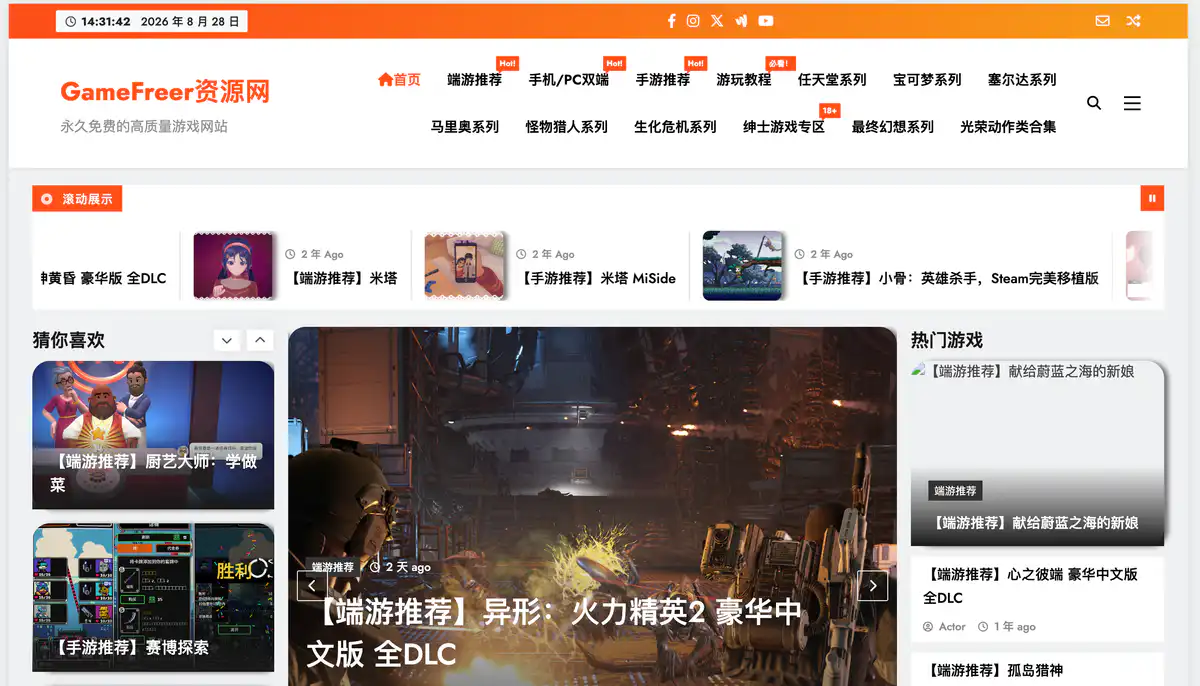
Site Introduction
GameFreer is a free sharing site for PC single-player games + mobile games built by a blogger, focusing on extract-and-play, Chinese-localized, and full-DLC resources. It covers PC games, mobile games, dual-platform (mobile/PC) titles, as well as dedicated sections for Nintendo, Pokémon, Zelda, and other franchises.
Core Features
1. PC Game Recommendations — Extract and Play, Fast Updates
PC single-player games are the main focus, covering action, RPG, strategy, simulation, and more.
Each resource post clearly includes: game name, language, size, version, and special notes. Common offerings include deluxe Chinese editions, full DLC, multiplayer patches, modded versions + saves — just download, extract, and play without bothering with installers.
2. Mobile Games + Mobile/PC Dual-Platform
Mobile game recommendations are direct-install APKs, no emulator required — play them right on your phone.
The Mobile/PC Dual-Platform section is for users who want to try both sides. Many mobile games are marked as localized, free-to-unlock full versions, and even IAP versions can be played as complete editions.
3. Franchise Sections + Gameplay Tutorials
Dedicated sections for Nintendo, Pokémon, Zelda, Mario, Monster Hunter, Resident Evil, Final Fantasy, etc., so you don't have to search the whole site for series titles.
Gameplay tutorials are in a separate column, with ready-made guides for installing games, running emulators, setting up multiplayer, etc. — beginner-friendly.
4. Site Search + Recommendations
A search box at the top lets you find games by name.
The homepage features Hot Games, Recommended for You, and You Might Have Missed, so you can discover older titles and hidden gems.
Pricing Model
Completely free — no memberships, no paid downloads. The site is sustained through social media engagement + voluntary tips to cover server costs.
Pricing is subject to change; please refer to the website: https://www.gamefreer.com/
Comparison with Similar Platforms
Unique Advantages
- Covers PC games + mobile games + dual-platform all in one site — no need to switch between multiple platforms
- Resource posts include complete info (version, size, localization, DLC status), with extract-and-play clearly indicated
Practical Highlights
- Download links use encrypted redirects (to prevent scraping and reselling), typically via Quark Drive and other cloud storage
- Franchise IP sections (Pokémon, Zelda, etc.) make finding series titles faster than general-purpose sites
Objective Shortcomings
- Downloads rely on cloud storage — without an account or premium membership, large files may be slow
- Encrypted links occasionally fail to open on mobile — you'll need to contact the blogger for fixes
Comparison Table
| Item | GameFreer | Steam Game Vault | Baiwan Single-Player |
|---|---|---|---|
| Pricing | Fully free | Fully free | Fully free |
| PC Games | ✅ Main focus | ✅ Main focus | ✅ Main focus |
| Mobile Games | ✅ Direct-install APK | ✅ Available | ❌ PC-oriented |
| Dual-Platform Section | ✅ Independent column | ❌ None | ❌ None |
| Franchise IP Sections | ✅ Nintendo/Pokémon etc. | ❌ Categorized by genre | ❌ Categorized by genre |
| Download Methods | Quark Drive, etc. | Quark/Xunlei/Baidu/Mobile Cloud | Cloud storage |
| Multiplayer Resources | Some with multiplayer patches | ✅ Separate multiplayer column | Some available |
| Support | One-on-one via QQ | In-site feedback | In-site feedback |
| Client App | None | ✅ Android app available | None |
Frequently Asked Questions
1. Is GameFreer really free? Do I need to register?
Free, no registration required. The announcement clearly states: all resources are shared for free, with no membership system. The tip QR code in the sidebar is voluntary — you can download normally without paying.
2. How do I download games? Which cloud storage is supported?
Go to the game detail page, click the download link to be redirected to an encrypted address, then to Quark Drive or other storage pages for download. Some resources may also have Baidu Drive links — check the actual links on the detail page. For large files, using a PC with the cloud storage client is more stable.
3. What does "extract-and-play" mean? Do I still need to install Steam?
It means after downloading, just extract (using WinRAR or similar) and run the game directly — no Steam installation process required. Many are integrated versions with full DLC and Chinese localization already packaged. Some posts may include cheat tools or multiplayer patch instructions.
4. Do mobile games require an emulator?
Most titles under Mobile Game Recommendations are direct-install APKs — install and play on your phone. The Mobile/PC Dual-Platform section clearly indicates how to download for each platform; just follow the instructions in the post.
5. What if the download link doesn't open on my phone?
The site uses encrypted anti-scraping on links, which can occasionally misbehave on mobile browsers. This is a known issue — try using a PC instead, or contact the blogger via QQ for support.
6. How do these resources differ from Steam legitimate versions? Are they legal?
The resources shared here are mostly integrated editions meant for users who want to try games first without committing to a purchase. Additionally, we recommend scanning any downloaded files with antivirus software — don't run them completely unprotected.