
ChatGPT Images
Posters, infographics, or UI mockups with legible text trip up many image tools—ChatGPT Images is noticeably stronger there. Generate and refine in chat, with multiple aspect ratios and batch variants. Free access exists but runs out fast; daily creators usually need Plus or higher.
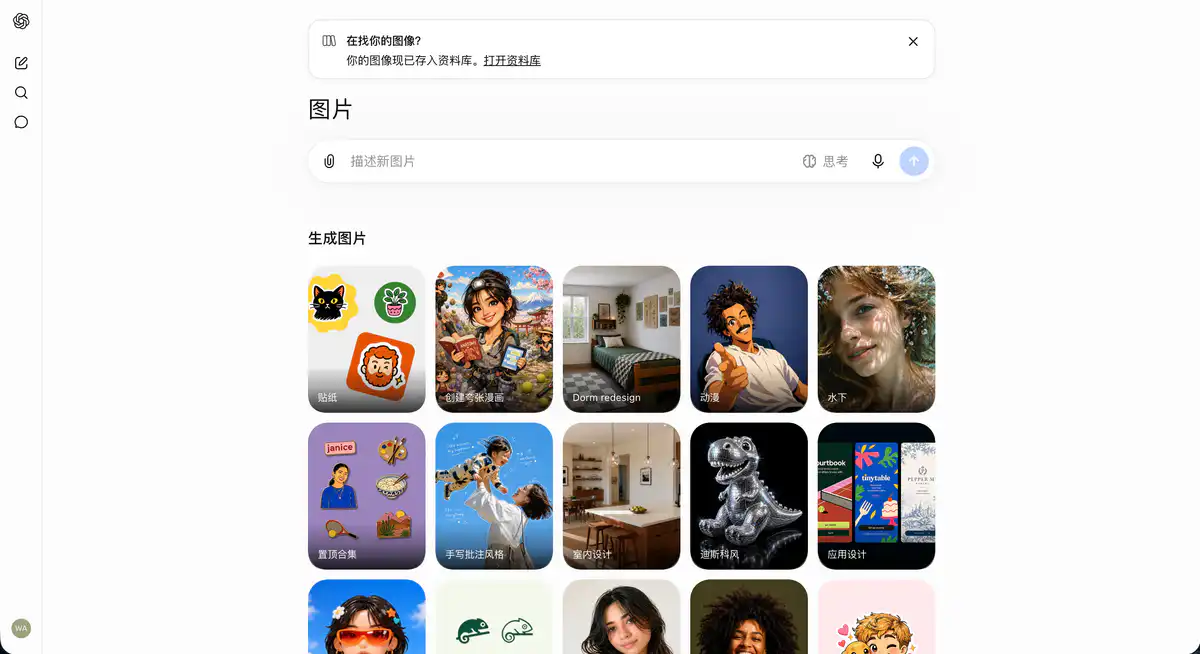
Site Overview
ChatGPT Images is OpenAI's built-in AI image generation entry point, powered by the ChatGPT Images 2.0 model. There's no need to install a separate app—just describe the image you want in ChatGPT to generate images from text; you can also upload photos for AI photo editing, style transfer, and poster creation. In April 2026, it fully replaced DALL·E 3, with stronger text rendering, layout control, and character consistency.
Core Features
1. Text-to-Image + Conversational Editing
Describe the image you want in natural language, and ChatGPT generates it directly. Not satisfied? Just keep chatting—"change the background to a night scene" or "remove the watermark in the top-left corner." Conversational AI image editing is more intuitive than traditional tools: you change one thing at a time, without redrawing the whole image. It also supports local region selection, so you can edit only a specified area while keeping the rest unchanged.
2. Thinking Mode: Think Before Drawing (Paid)
Plus / Pro / Business users can enable Images with Thinking. The model reasons before generating: it plans the layout, verifies text counts, checks typography, and can even search the web for real-time information (stock prices, match results, event dates) to include in the image. When creating infographics, posters, or multilingual layouts, the chance of getting it right the first time is much higher. The free version only has Instant mode, which is faster but more prone to errors with complex layouts.
3. Multilingual Text + 2K High-Resolution Output
GPT Image 2 excels at rendering text inside images, supporting 7+ writing systems including Chinese, Japanese, Korean, Hindi, and more. Text on posters, menus, and PPT covers is basically readable. Maximum 2K resolution, with aspect ratios selectable from 3:1 to 1:3. A single prompt can generate up to 8 variants with consistent style, which is convenient for creating a series of visual assets.
4. Upload Reference Images + Add Yourself
Upload reference images in JPG, PNG, WEBP, and other formats (single file up to about 20MB) to let the AI generate based on your face, product, or brand elements. The Images page has an "Add yourself" template: upload a selfie and generate professional headshots, travel photos, anime-style avatars, and more. If you clearly state in the prompt to "keep facial features unchanged," character consistency is much more stable than in the previous generation.
Pricing Model
Image generation is tied to the ChatGPT subscription plan and is billed separately from the API.
| Plan | Price | Image Capabilities |
|---|---|---|
| Free | $0 | ✅ AI image generation available; stricter limits; no Thinking mode |
| Go | $8/month | Expanded image generation quota and upload capacity |
| Plus | $20/month | ✅ Thinking mode; higher usage limits; ad-free |
| Pro | $100 or $200/month | Thinking mode + highest usage; officially described as near-unlimited (with abuse protection) |
| Business | About $25/user/month | Thinking mode; team collaboration |
| API (gpt-image-2) | Billed per Token | Developer standalone access, not included in ChatGPT subscription |
What can you do for free?
- Basic text-to-image and simple AI image editing
- Instant mode, about 30 seconds per image
- OpenAI has not published specific image count limits; free tier limits are stricter than paid, and there may be queues during peak times
Core value of paid plans:
- Thinking mode (Plus and above): for infographics, posters, and text-heavy layouts
- Higher generation quotas and priority queue
- Reference image upload and advanced editing features may be restricted in the free tier
Pricing may change; please refer to the official website: https://chatgpt.com/pricing
Comparison with Similar Platforms
Unique Advantages
- Integrated ChatGPT ecosystem: chat, writing, code, and images in one account—no need to switch tools
- Thinking + web search for infographics is a differentiator, able to insert real-time data into images
- Conversational editing feels natural—editing an image is like texting a designer
Practical Highlights
- Multilingual text within images has high accuracy; Chinese posters are directly usable
- Shares an ecosystem with Sora, Codex, etc., so video/code/image can be chained into workflows
Objective Limitations
- Free quota is opaque—OpenAI does not publish specific image counts; third-party estimates range from "2–5 images per day," and actual limits fluctuate with demand
- Complex image generation is slow; Thinking mode may take 1–3 minutes
- Fine-grained control is not as good as Midjourney's parameter tuning; batch production is not as strong as dedicated AI art platforms
Side-by-Side Comparison
| Comparison Item | ChatGPT Images | Midjourney | Google Gemini Image | Adobe Firefly |
|---|---|---|---|---|
| Entry price | Free + $20/month Plus | About $10/month | Free + subscription | Free + Creative Cloud |
| Usage method | Conversational prompt | Discord / web | Conversation / search | Within Creative Cloud |
| Text rendering | Very strong (7+ languages) | Medium | Strong | Good |
| Real-time web data | ✅ Thinking mode | ❌ | Partially supported | ❌ |
| Fine-grained control | Conversational editing | Rich parameters | Medium | Professional-grade |
| Best for | Daily creation, infographics | Art/concept design | Google ecosystem users | Designers/brands |
FAQ
1. What is the relationship between ChatGPT Images and DALL·E?
DALL·E 3 has been replaced by GPT Image 2 (ChatGPT Images 2.0). The official DALL·E GPT will be discontinued on August 30, 2026. From now on, use ChatGPT Images for generating and editing images.
2. How many images can the free version generate?
OpenAI has not published a specific number. What is confirmed: all plans can generate images, but the free tier has stricter limits on advanced features (including images). The "X images per day" claims online are community estimates and will vary with server load.
3. Is Thinking mode worth upgrading to Plus?
If your images contain more than 5 blocks of text, require accurate numbers/dates, or need multilingual layout, it is worth it. For social media thumbnails and simple illustrations, the free Instant mode is sufficient. Plus at $20/month is the minimum threshold for enabling Thinking mode.
4. How do I generate images in ChatGPT?
Two ways: describe the image directly in conversation, or click "More" → "Images" to enter the dedicated interface. You can also go directly to chatgpt.com/images/ and use templates like Add yourself to get started quickly.
5. Is it safe to upload my own photos?
OpenAI has data processing policies. When it involves real people's portraits, the official advice is to confirm that you have the right to use that likeness. Writing "keep facial features unchanged from the uploaded image" in the prompt can reduce the problem of the AI altering faces.
6. Can generated images be used commercially?
Per the OpenAI Terms of Use and your plan type. Attribution to OpenAI is not mandatory, but you must comply with content policies (no infringing, misleading content, etc.). It is recommended to read the latest terms before commercial use.
7. What are some tips for editing images?
Change one thing at a time. If you cram five edits into one prompt, the model is likely to redraw the entire image. Change the background first, confirm it, then adjust the lighting. When editing, keep the prompt closely tied to the target image and avoid too much unrelated conversation. Local region selection + textual description supports precise modifications.
8. How do developers access it?
Via the OpenAI API with the gpt-image-2 model, billed independently of ChatGPT subscriptions. A ChatGPT subscription does not equal API quota. For high-volume generation, the API is more cost-effective.