
51 Software
The go-to spot when you need pro software without hunting around—clear categories and up-to-date versions. It aggregates Adobe, CAD, Office and other professional tools with download links and install notes for designers and office users.
Editor's Picks
- The academic version of CodexThe academic version of Codex is QieWen Academic, a research AI developed by Fudan University, featuring zero hallucinations and 360 million real publications.
- 莆田潮牌鞋服-货源六年老店,一手货源,主营各大品牌潮牌鞋子,耐克、阿迪、匡威、彪马、萨洛蒙、始祖鸟、迪桑特等品牌,主打中高端品质,另外也有潮牌服饰、苹果耳机、卡西欧、包包等爆款商品。
- zhimanju从剧本到成片的一站式AI漫剧生成,助力创作者一键打造爆款漫剧内容。知漫剧内置AI剧本创作、漫剧资产管理、作品记录等核心功能,电脑桌面端解锁无限画布、制片工作台与批量创作等进阶能力。
- GPT国内直连一个把GPT、Claude、Gemini等AI聚合在一起的平台,国内直连、打开即可使用
- zeekeai一个聚合GPT、Claude、DeepSeek等AI大模型的中转站。ZEEKEAI支持国内国外主流AI聊天、AI生图、AI绘图、AI生视频、PPT、证件照、制作简历等多种特色功能
- 网站流量统计Open-web专业易用第三方网站流量统计平台,依托实时数据看板,解析爬虫动态、追踪用户行为,精细来路分析赋能 SEO,提升站点排名。
- IP address search可达街道级IP归属地查询-精准安全快速的IP地址查询网站-支持IPv4/IPv6信息批量查询







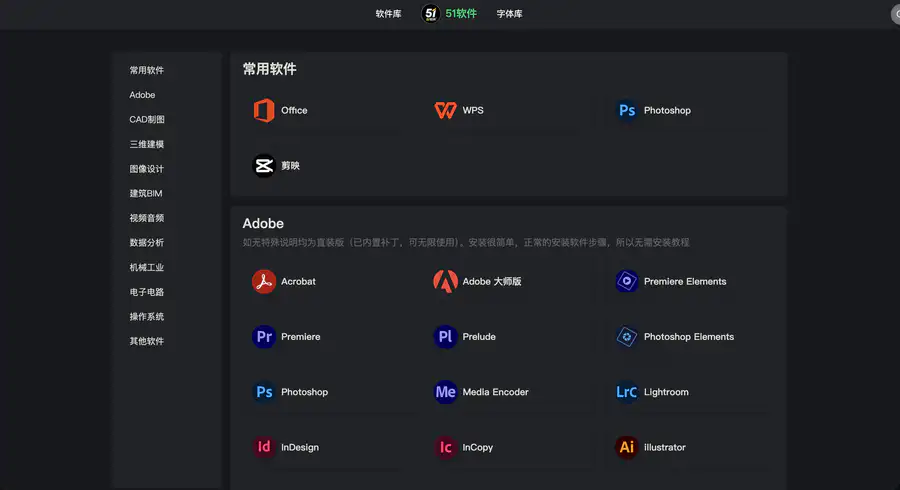
Site Overview
51 Software is a software download site with a professional focus. It specializes in heavyweight software such as Adobe downloads, CAD software, and office software. Its categories are clear, and its versions are kept up to date, making it convenient when looking for professional software downloads.
Core Features
Find software by category without browsing blindly.
The homepage is organized into commonly used software, Adobe, CAD drafting, 3D modeling, video and audio, and other sections. Design software and office software can be found at a glance.
Frequent updates for mainstream software versions.
It covers common needs such as Photoshop download, Premiere download, Office download, WPS download, AutoCAD download, and CapCut download, as well as entries for DaVinci Resolve download, SolidWorks download, MATLAB download, and more.
Straightforward instructions.
Many pages note installation cautions and version differences. When you encounter direct-install software or need a software installation tutorial, you generally do not have to search elsewhere.
Multiple cloud-drive mirrors for downloads.
Resources mostly use Baidu, Xunlei, and Quark for cloud-drive downloads. Browsing does not require registration, making it suitable to bookmark as a daily software library.
Pricing Model
Currently, no membership wall is visible for browsing the site or at the free software download entry, and no on-site recharge packages are seen.
Downloads go through third-party cloud drives. Whether to buy a cloud-drive membership for faster speeds is unrelated to this site.
Pricing may change; please refer to the website: https://www.51ruanjian.com/
Comparison with Similar Platforms
- Unique advantages
- The sections are more oriented toward professional scenarios, with detailed divisions for Adobe, CAD, BIM, mechanical, and electronic circuit software.
- Commonly used entries place the Adobe suite, Office, and WPS near the top, making them quick to find.
- Page instructions are practice-oriented, with installation notes written next to the resources.
- Practical highlights
- Software resources cover design, engineering, and data analysis software, not just graphic design.
- Multiple cloud drives run in parallel, so if one link is down, you can try another drive.
- Objective shortcomings
- The site is relatively new, and its brand awareness and community discussion still lag behind established software sites.
- Large files depend on cloud drives, and non-members’ speeds are easily throttled; the experience depends on the cloud drive rather than the site.
| Comparison Item | 51 Software | xu5 Software Library | Ruan Daxia |
|---|---|---|---|
| Focus | Clear classification of professional tools | Broader coverage | Very fast updates for design software |
| Browsing threshold | No login required | No login required | No login required |
| Download method | Mainly cloud drives | Both cloud drives and direct links | Mainly cloud drives |
| Completeness of instructions | Detailed installation instructions | Many entries, uneven instructions | Dense entries, pages more news-style |
| Clear weakness | Relatively new site | More cluttered categories | Higher search and reading costs |
FAQ
What is 51 Software for?
It is a professional-oriented software download site for Windows users, focusing on organizing software resources for design, drafting, office, modeling, and other areas, making it easy to find versions by category.
Do I have to register or activate an on-site membership?
Based on the current pages, browsing and accessing download instructions do not require an on-site membership. Whether to buy a cloud-drive membership separately depends on whether you want faster speeds.
How is it different from ordinary green software sites?
It is more oriented toward professional software downloads: Adobe, AutoCAD, 3D, and engineering categories account for a high proportion. It is not mainly a collection of small tools.
What should I do if downloads are slow?
A common cause is cloud-drive speed limits. The site also explains that reaching full bandwidth usually requires a corresponding cloud-drive membership, and this is unrelated to 51 Software’s charges.
Where is the extraction password?
The site instructions are clear: most shares have no password; if there is one, first check the instructions inside the archive or the page download instructions.
Who is it suitable for bookmarking?
Design, engineering, and office users who often look for Photoshop download, CAD software, Premiere download, or Office/WPS will find it very suitable as a portal site.